

How to Correctly Coin Your Trading Cards

Quote from SundoCards on January 7, 2026, 3:24 amCoining is a standard method used in trading card communities to verify ownership of a card.
It involves placing a piece of paper in the photo with a handwritten username and the current date next to the card.
This confirms that the person posting the image physically has the card at the time the photo was taken.
Coined images help prevent the use of stolen photos recycled listings and false claims of ownership.
Because the username and date are unique to the seller and the moment the photo was taken the image can be matched directly to the person offering the card.
With AI, it has become much easier to fake realistic handwriting, and scammers are more active than ever.
This guide explains how coining works and how to use it correctly when buying selling or trading cards.
Also read the Guide to Avoiding Coined Image Scams & AI Generated Cards
How to Coin correctly
Coining is used to prove that you physically own a card at the time of a sale or trade.
A correct coin should make it impossible for someone else to reuse your photo.
What you need
- A piece of plain paper or a clear card sleeve/toploader
- A pen or marker that is easy to read
- The trading cards you are listing
- A camera or phone
What to write on the coin
Write the following by hand on the paper
- Your exact username
- The full date the photo is taken
Do not print this text or use a digital overlay. It must be handwritten so it cannot be easily reused.
Example format:
Username
DD MM YYYYHow to place the coin
- Put the paper next to the card in the same frame
- Make sure both the card and the coin are fully visible
- The writing must be clear and readable
- Place it in a way that makes it hard for someone to change the name (examples below)
- The coin should be close enough to the card that it is obvious they were photographed together.
- Avoid leaving an easily editable piece of paper clearly on its own, as these can be changed by scammers.
When to update your coin
You should create a new coin when
- The date changes
- You relist the card
- A buyer or trader asks for a fresh verification
A current coin is important because it shows you still have the card.
Before you do a deal
Go through this checklist to avoid being scammed by fake coins:
- Username is handwritten
- Date is handwritten and current
- Paper is in the same photo as the card
- Writing is clear and readable
- Card is fully visible
- Photo is not edited cropped or filtered
- Photo was taken specifically for this listing
- The seller can create new coined images if asked
You can use Google to reverse image search to make sure the image hasn't been stolen from somewhere else or another seller.
Example of risky coining
Scammers will alter the username and date on images
Try not to leave your coined note in an easily editable location.
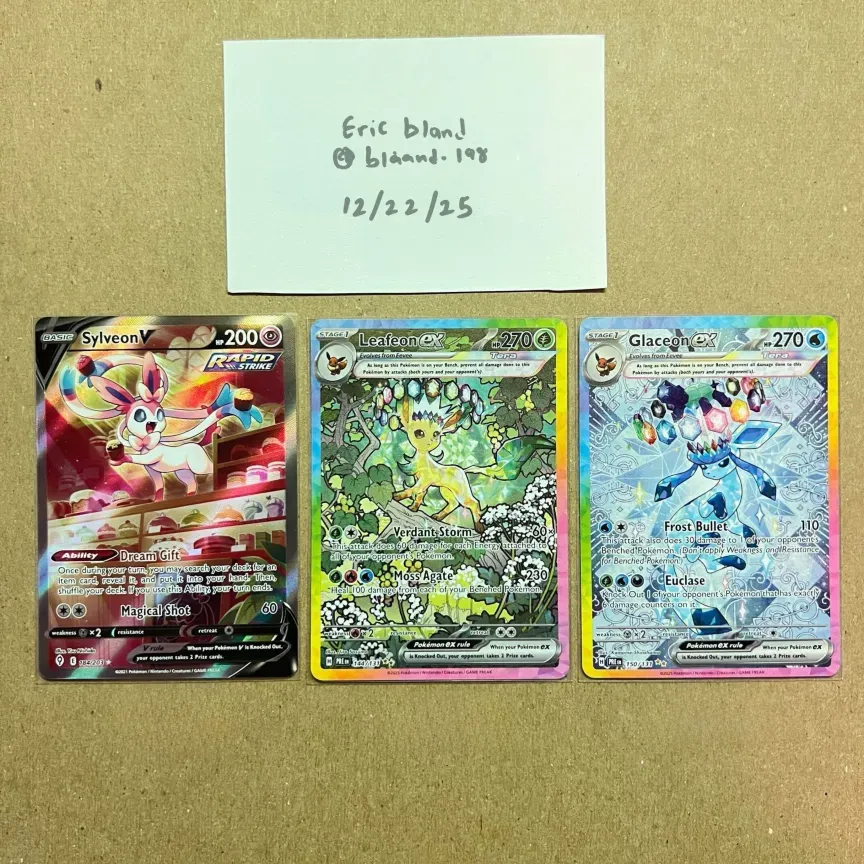
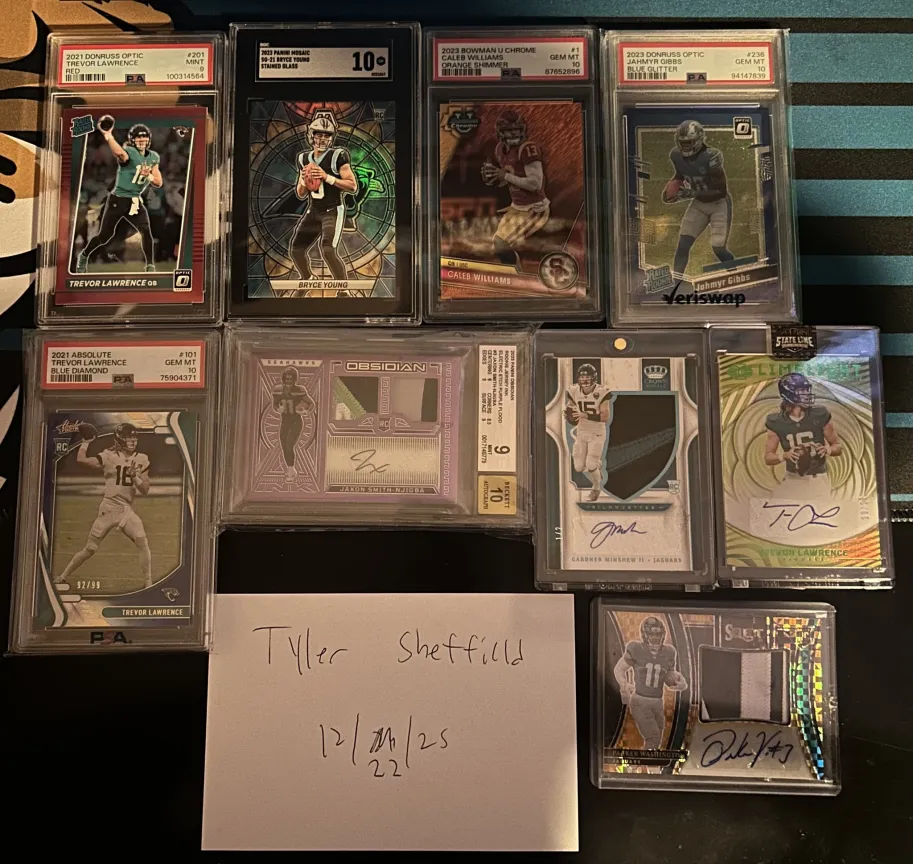
Examples of good coining
Obfuscating part of the username/paper under the clear case makes editing difficult
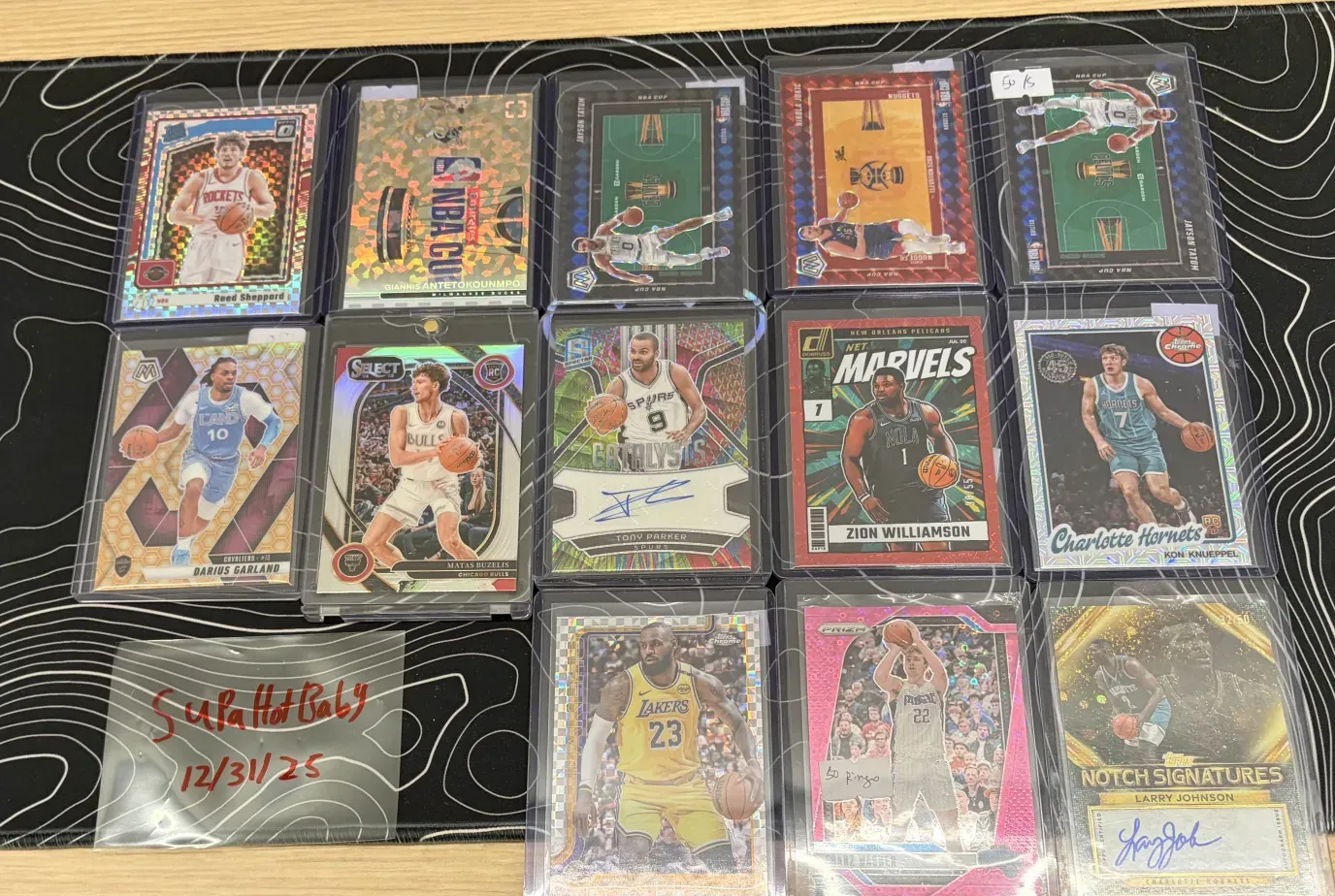
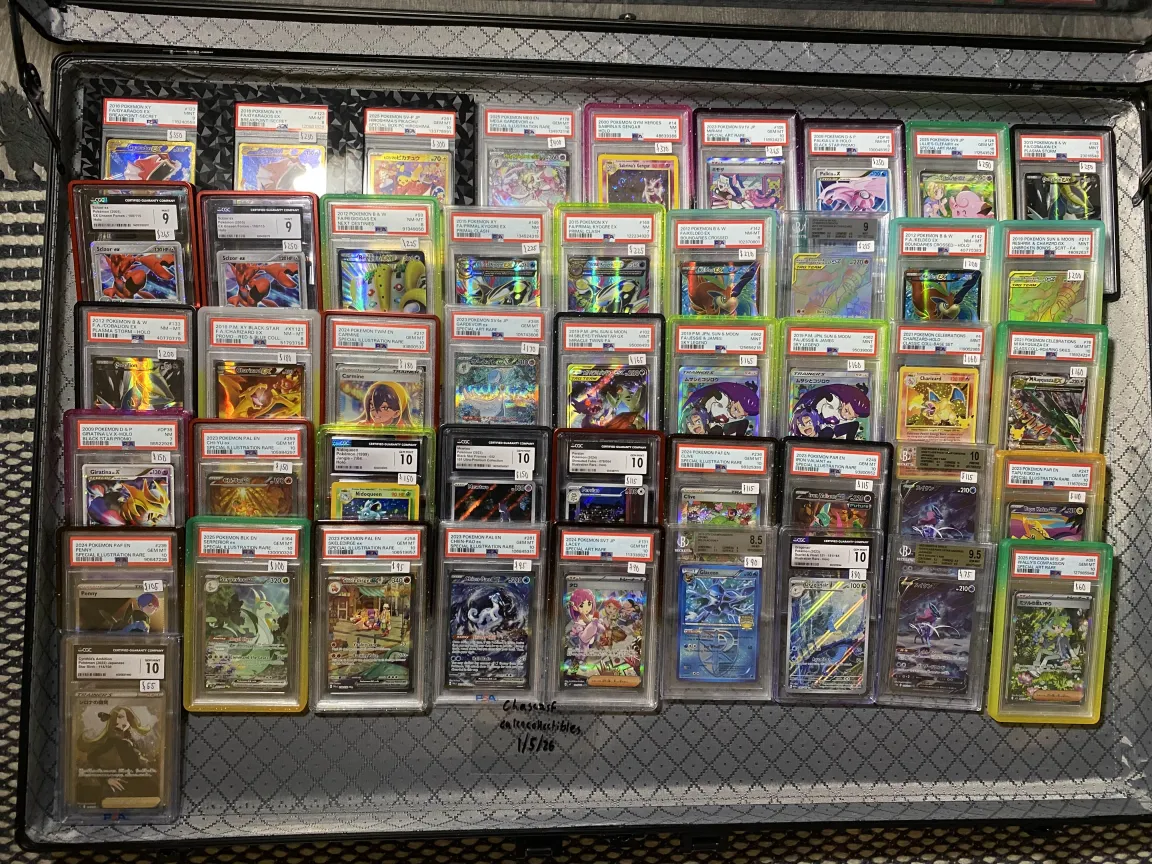
Leave the note under the item or above complex backgrounds make it harder to fake.
Using a clear sleeve to coin and sitting it over a complex background.
Also read the Guide to Avoiding Coined Image Scams & AI Generated Cards
Coining is a simple but important step in trading cards online. By including a handwritten username and date in your photos you provide clear proof that you have the card in your possession at the time of listing.
This helps reduce scams prevents image reuse and builds trust between buyers and sellers.
When done correctly coining protects both sides of a trade and makes the entire marketplace safer and more reliable.
Making it part of your standard process is one of the easiest ways to show that you are a legitimate and responsible trader.
Stay safe and FUCK scammers.
Coining is a standard method used in trading card communities to verify ownership of a card.
It involves placing a piece of paper in the photo with a handwritten username and the current date next to the card.
This confirms that the person posting the image physically has the card at the time the photo was taken.
Coined images help prevent the use of stolen photos recycled listings and false claims of ownership.
Because the username and date are unique to the seller and the moment the photo was taken the image can be matched directly to the person offering the card.
With AI, it has become much easier to fake realistic handwriting, and scammers are more active than ever.
This guide explains how coining works and how to use it correctly when buying selling or trading cards.
Also read the Guide to Avoiding Coined Image Scams & AI Generated Cards
How to Coin correctly
Coining is used to prove that you physically own a card at the time of a sale or trade.
A correct coin should make it impossible for someone else to reuse your photo.
What you need
- A piece of plain paper or a clear card sleeve/toploader
- A pen or marker that is easy to read
- The trading cards you are listing
- A camera or phone
What to write on the coin
Write the following by hand on the paper
- Your exact username
- The full date the photo is taken
Do not print this text or use a digital overlay. It must be handwritten so it cannot be easily reused.
Example format:
Username
DD MM YYYY
How to place the coin
- Put the paper next to the card in the same frame
- Make sure both the card and the coin are fully visible
- The writing must be clear and readable
- Place it in a way that makes it hard for someone to change the name (examples below)
- The coin should be close enough to the card that it is obvious they were photographed together.
- Avoid leaving an easily editable piece of paper clearly on its own, as these can be changed by scammers.
When to update your coin
You should create a new coin when
- The date changes
- You relist the card
- A buyer or trader asks for a fresh verification
A current coin is important because it shows you still have the card.
Before you do a deal
Go through this checklist to avoid being scammed by fake coins:
- Username is handwritten
- Date is handwritten and current
- Paper is in the same photo as the card
- Writing is clear and readable
- Card is fully visible
- Photo is not edited cropped or filtered
- Photo was taken specifically for this listing
- The seller can create new coined images if asked
You can use Google to reverse image search to make sure the image hasn't been stolen from somewhere else or another seller.
Example of risky coining
Scammers will alter the username and date on images
Try not to leave your coined note in an easily editable location.
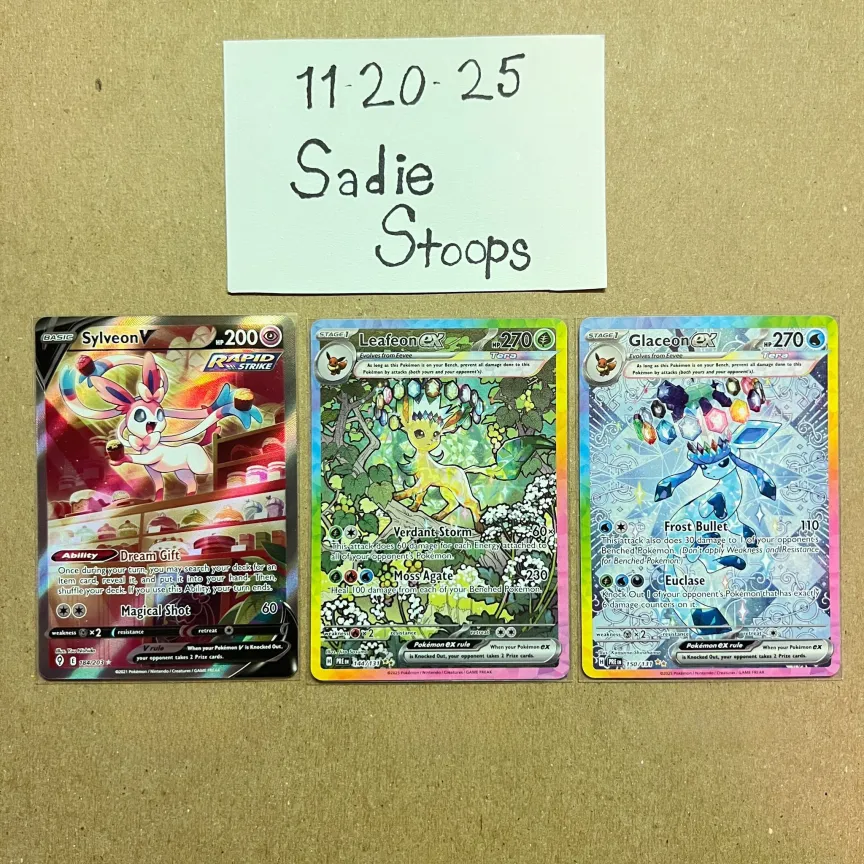
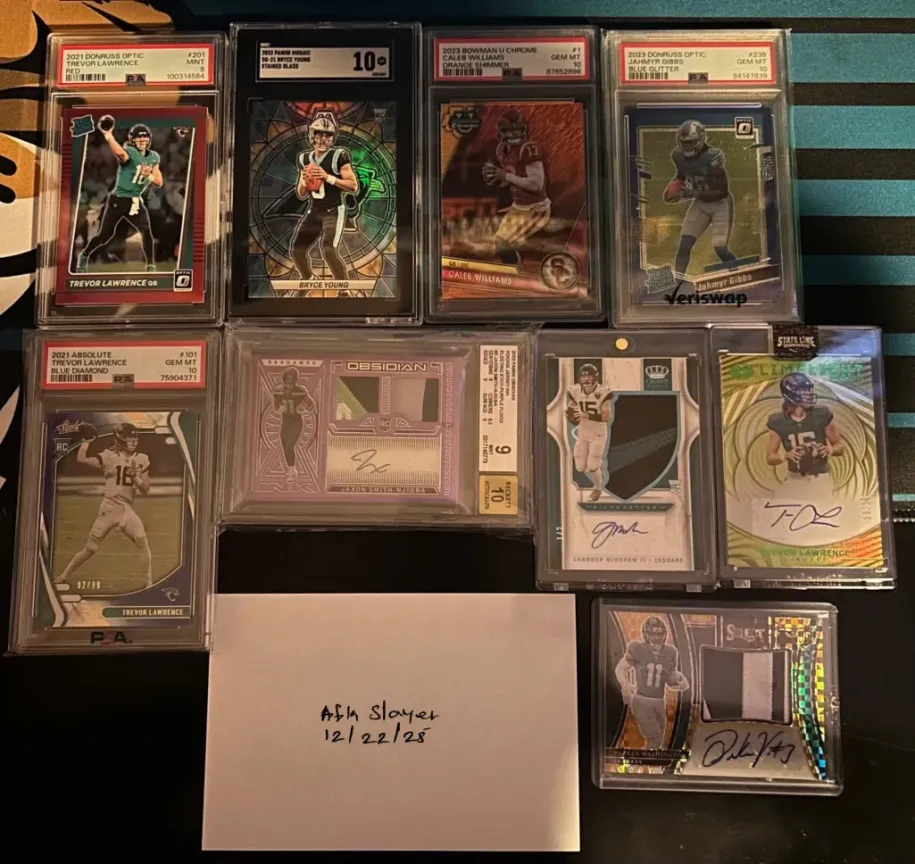
Examples of good coining
Obfuscating part of the username/paper under the clear case makes editing difficult
Leave the note under the item or above complex backgrounds make it harder to fake.
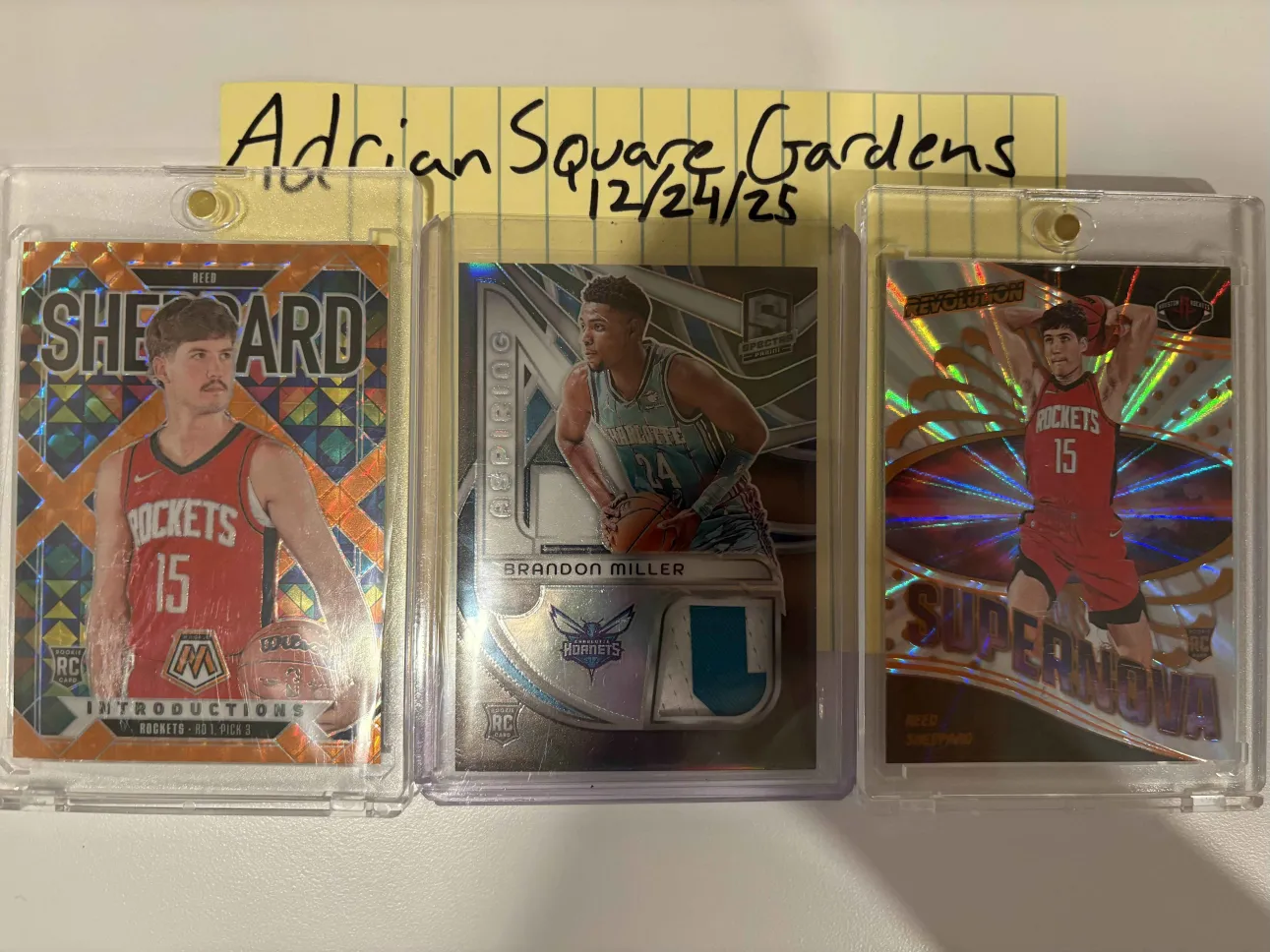
Using a clear sleeve to coin and sitting it over a complex background.
Also read the Guide to Avoiding Coined Image Scams & AI Generated Cards
Coining is a simple but important step in trading cards online. By including a handwritten username and date in your photos you provide clear proof that you have the card in your possession at the time of listing.
This helps reduce scams prevents image reuse and builds trust between buyers and sellers.
When done correctly coining protects both sides of a trade and makes the entire marketplace safer and more reliable.
Making it part of your standard process is one of the easiest ways to show that you are a legitimate and responsible trader.
Stay safe and FUCK scammers.